0 ratings






Item #:
220454008
WAVLINK USB C DisplayLink Docking Station with 3 HDMI 4K60Hz,Displaylink Triple Display Docking Station for MacBook M1/M2/M3/Windows,5 USB
Item #:
220454008
SLL 3778879
Price Details
Excluding Shipping & Custom charges ( Shipping and custom charges will be calculated on checkout )
*All items will import from US
In stock
 Imported from USA store
QTY:
Only 15 items left in stock.
Order now and get it around Saturday, July 04
Secured transaction
Ubuy works hard to protect your security and privacy. Our advanced payment security system ensures confidentiality by encrypting your information during transmission using AES (Advanced Encryption Standards) and SSL (Secure Socket Layer) protocols. Your payment details are 100% secure as we do not share your payment details with third party sellers.
Our Top Logistics Partners


Unlock the full potential of your MacBook M1/M2/M3 or Windows laptop with the WAVLINK Displaylink Triple Display Docking Station.

Fast
Shipping

Free
Return*

Secure Packaging

100% Original Products

PCI DSS Compliance

ISO 27001 Certified


Note: Step Down Voltage Transformer required for using electronics products of US store (110-120). Recommended power converters Buy Now.


What Stands Out
Triple Display Support
Experience enhanced productivity with triple display output, allowing you to connect three monitors at 4K 60Hz resolution, perfect for multitasking on MacBook M1/M2/M3 and Windows devices.
Versatile Connectivity
Equipped with 5 USB ports, 2 DisplayPorts, Ethernet, and audio/mic jacks, this docking station provides comprehensive connectivity options to complement your workspace and meet diverse user needs.
User-Friendly Setup
Designed for plug-and-play convenience, the WAVLINK docking station requires no additional drivers, ensuring a hassle-free setup for users on both Mac and Windows systems.
Product Details
- 【Break the limit for M1/M2/M3】Unlock the full potential of your MacBook M1/M2/M3 or Windows laptop with the WAVLINK Displaylink Triple Display Docking Station. This USB C docking station allows you to effortlessly extend up to triple monitors with stunning 4K@60Hz resolution. Whether you need a triple 4K display setup or a mix of HDMI and DP connections, this docking station 3 monitors solution delivers exceptional visual clarity and productivity
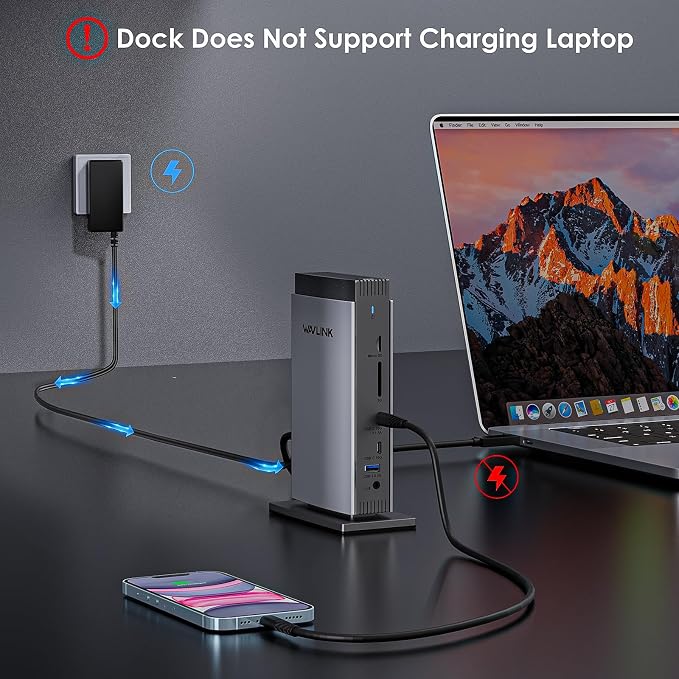
- 【What Ports Can be Extended】The WAVLINK docking station 3 monitors expand 15 ports for daily use:3x4K HDMI+ 2x4K DP+3x 5Gbps USBA port(only data)+USB C 3.1 Gen2 port(only data)+ 2x10Gbps USB C ports(data & charge)+ Gigabit Ethernet+ 3.5 mm audio+SD/TF(104MB/s).With this laptop docking station,you can easily integrate all your peripherals through one USB-C connection,making it the ideal docking station 3 monitors HDMI ports and more. Remember: Laptop charging is not supported by the dock
- 【High-Speed Data Transfer】Experience rapid data transfer with multiple USB-A and USB-C ports that support speeds up to 10Gbps.And the USB C docking station has three 5Gbps USB-A ports and a 10Gbps USB-C 3.1 Gen1 port(USBA/C 3.2 Gen1 only supports data transfer), ensures smooth and fast performance.The SD/TF card slots are perfect for photographers and designers,making this a versatile triple 4K display docking station for professionals
- 【Broad Compatibility】The WAVLINK USB-C docking station is designed to be highly compatible with a range of devices. It works seamlessly with MacBook M1/M2/M3, Windows laptops, Chrome OS, Ubuntu, and Android systems. Simply install the latest DisplayLink drivers to enjoy the full functionality of this docking station, which is perfect for any setup requiring a reliable USB-C docking station triple monitor solution
- 【Adequate 40W DC In Power】This USB C docking station triple monitor includes a 40W DC input power adapter which ensures there's enough power to run all connected peripherals efficiently during data transfer or display usage, keeping your workstation operational without depleting your laptop's power reserve. Remember: Laptop charging is not supported by the dock
- 【service】We're here for you! Got questions? Call us at +18889730883 (UTC-5), Monday to Friday, 9AM - 6PM. Or shoot us an email at [email protected] on solutions within 8 hours, plus enjoy a lifelong technical support. Your satisfaction is our priority!
| Hardware Interface | 3.5mm Audio, Ethernet, HDMI, Mini-DisplayPort, USB |
| Compatible Devices | Android 5.0 or later with USB OTG cable, Chrome OS and Harmony OS, Mac OS 10.14-14.x and latest, Ubuntu 20.04, 22.04, 23.04, 24.04, Windows 11/10/8.1/8/7/XP/Vista |
| Total Usb Ports | 5 |
| Number of Ports | 15 |
| Total Number of HDMI Ports | 3 |
| Wattage | 40 |
| Item Dimensions L x W x H | 8.1"L x 5.3"W x 4.8"H (20.6 x 13.5 x 12.2 cm) |
| Color | grey |
| Brand | WAVLINK |
| Global Trade Identification Number | 06955362056575 |
| Manufacturer | WAVLINK |
| Model Number | UG69DK13 |
| Compatible Devices | Android 5.0 or later with USB OTG cable, Chrome OS and Harmony OS, Mac OS 10.14-14.x and latest, Ubuntu 20.04, 22.04, 23.04, 24.04, Windows 11/10/8.1/8/7/XP/Vista See more |
| Total USB Ports | 5 |
| Product Dimensions (L x W x H) | 8.1"L x 5.3"W x 4.8"H (20.6 x 13.5 x 12.2 cm) |
| Total HDMI Ports | 3 |
| Number of Items | 1 |
Who Should Buy?

-
Creative Professionals
Ideal for graphic designers and video editors needing multiple displays for efficient workflow and high-resolution visuals.
-
Business Users
Suitable for professionals who require connecting multiple monitors during presentations and video conferences for enhanced productivity.
-
Students and Researchers
Perfect for students using MacBooks who need to connect additional screens for multitasking during research and assignments.

-
Casual Users
Not ideal for those who only use their laptops for basic tasks as multiple outputs may be unnecessary.
-
Gamers
Not suitable for gaming due to latency and lack of high refresh rate support compared to gaming-specific docking stations.
-
Power Users
May not meet the needs of hardcore users who require charging capabilities along with multiple connectivity options.
Product Description
Have any Query? Chat with us
Customer Questions & Answers
-
Question:
What are the main features of the WAVLINK USB C DisplayLink Docking Station?
Answer: The WAVLINK USB C DisplayLink Docking Station offers impressive features such as three HDMI outputs capable of delivering 4K video at 60Hz, multiple USB ports for enhanced connectivity, and compatibility with MacBooks (M1, M2, M3) and Windows devices. With this dock, you can expand your workspace by connecting multiple monitors and various peripherals seamlessly. This versatility makes it an ideal choice for professionals who need a reliable solution for multitasking and improving productivity. -
Question:
Is the WAVLINK Docking Station compatible with my MacBook?
Answer: Yes, the WAVLINK USB C DisplayLink Docking Station is specifically designed to work with MacBook models that use M1, M2, and M3 chips. It leverages DisplayLink technology to ensure that all your displays function optimally and provides users with a seamless experience when connecting external monitors to their MacBook. This is particularly beneficial for graphic designers or video editors who rely on high-resolution monitors to view their work accurately. -
Question:
Can I connect multiple monitors using the WAVLINK Docking Station?
Answer: Absolutely! The WAVLINK USB C DisplayLink Docking Station supports triple display setups using three HDMI ports, allowing you to connect multiple monitors simultaneously. This feature is perfect for users who require a more extensive digital workspace, such as traders who monitor multiple data streams or programmers who run numerous applications at once, streamlining their workflow. -
Question:
What types of devices can I connect to the docking station?
Answer: The docking station can be connected to various devices including modern MacBooks (with M1, M2, and M3 processors) and most Windows laptops and PCs. Additionally, it can support peripherals like keyboards, mice, printers, and external storage devices through its 5 USB ports, making it a versatile addition to your tech setup. This ensures that you are well-equipped whether you are working from home, a co-working space, or a traditional office. -
Question:
Do I need any additional software to use the WAVLINK Docking Station?
Answer: Yes, you will need to install DisplayLink drivers to take full advantage of the docking station's capabilities. This step ensures that your operating system can communicate properly with the docking station, allowing for smooth functionality across multiple displays and connected devices. Users should follow the setup instructions in the user manual to get started seamlessly, ensuring optimal performance from the dock. -
Question:
What is the maximum resolution supported by the HDMI outputs?
Answer: The WAVLINK Docking Station supports a maximum resolution of 4K at 60Hz on all three HDMI outputs. This high resolution allows for crystal-clear images and vibrant colors, making it perfect for tasks such as video editing, graphic design, or viewing high-definition media. Users will find this beneficial for presentations or any work requiring high visual fidelity. -
Question:
How does the USB-C connectivity enhance functionality?
Answer: USB-C connectivity in the WAVLINK Docking Station allows for rapid data transfer, power delivery, and video output through a single cable. This reduces cable clutter and enhances the overall user experience by simplifying the connection process. Users can benefit significantly when using high-speed storage drives or charging their devices while simultaneously using peripherals, making it a great choice for productivity-focused individuals. -
Question:
Can I use the WAVLINK Docking Station with a laptop that doesn't support USB-C?
Answer: Unfortunately, the WAVLINK Docking Station is designed to connect via USB-C ports specifically. If your laptop does not support USB-C, it will not be compatible with this docking station. However, those with USB-C connectivity can enjoy the advantages of multiple display outputs and additional USB ports, making this device ideal for modern laptops. -
Question:
Where can I buy WAVLINK USB C DisplayLink Docking Station?
Answer: You can purchase the WAVLINK USB C DisplayLink Docking Station from Ubuy in Sierra Leone. Ubuy offers a reliable shopping experience with a wide range of tech products, including this high-performance docking station, ensuring you have access to the latest technology tailored to your needs. -
Question:
What is DisplayLink technology and how does it work with this docking station?
Answer: DisplayLink technology enables multiple displays to be connected to a computer using a USB connection, encapsulating video data for efficient performance. The WAVLINK Docking Station uses this technology to provide seamless support for up to three HDMI outputs, ensuring high-resolution displays run smoothly. It's particularly useful for users in environments where screen space is critical, such as financial analysts or developers working with several applications.
WAVLINK Docking Stations UG69DK13 Editorial Review


No editorial reviews found
Customer Reviews & Ratings
222 customers ratings
-
5 Star
63%
-
4 Star
7%
-
3 Star
10%
-
2 Star
2%
-
1 Star
18%
Review this product
Share your thoughts with other customers
Product Price History
Important information
- Limitations : For products shipped internationally, please note that any manufacturer warranty may not be valid; manufacturer service options may not be available; product manuals, instructions, and safety warnings may not be in destination country languages; the products (and accompanying materials) may not be designed in accordance with destination country standards, specifications, and labeling requirements; and the products may not conform to destination country voltage and other electrical standards (requiring use of an adapter or converter if appropriate). The recipient is responsible for assuring that the product can be lawfully imported to the destination country. When ordering from Ubuy or its affiliates, the recipient is the importer of record and must comply with all laws and regulations of the destination country.
- Not all the products listed on Ubuy are for sale, as Ubuy is a global search engine. Products are subject to export/trade regulations.
SLL 3778879
Order now and get it around Saturday, July 04
This item is not restrict in my country.(Please click on above link if this item is not restrict in your country, So our team will review and allow.)
QTY:
Only 15 items left in stock.
Secured transaction
Ubuy works hard to protect your security and privacy. Our advanced payment security system ensures confidentiality by encrypting your information during transmission using AES (Advanced Encryption Standards) and SSL (Secure Socket Layer) protocols. Your payment details are 100% secure as we do not share your payment details with third party sellers.
Our Top Logistics Partners
Fastest cross-border delivery
Features & Benefits
- Extend up to triple monitors with stunning 4K@60Hz resolution.
- Equipped with 15 versatile ports for seamless connectivity.
- Experience rapid data transfer speeds up to 10Gbps.
- Broad compatibility with MacBook and various operating systems.
- Includes a 40W DC adapter for efficient power to connected peripherals.
- Lifetime technical support ensuring customer satisfaction.