0 ratings


Item #:
222251362
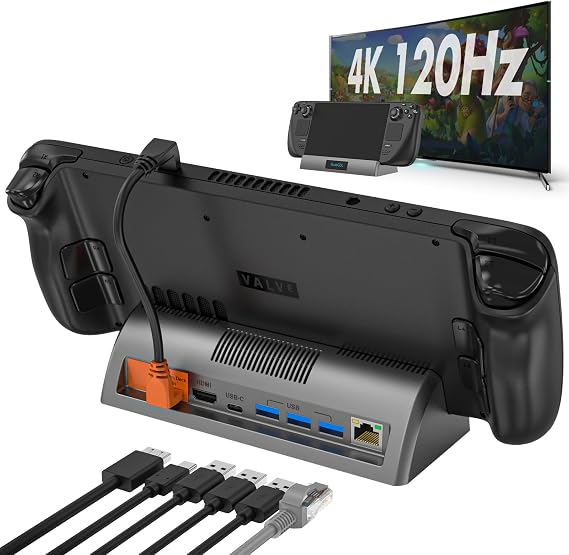
Steam Deck Docking Station - 4K@120Hz HDMI, Gigabit Ethernet, 3 USB 3.0 Ports
70% of respondents would recommend this to a friend
Item #:
222251362
SLE 1372
Price Details
Excluding Shipping & Custom charges ( Shipping and custom charges will be calculated on checkout )
*All items will import from US
0 ratings
Write a review
In stock
 Imported from USA store
QTY:
Order now and get it around Thursday, September 24
Secured transaction
Ubuy works hard to protect your security and privacy. Our advanced payment security system ensures confidentiality by encrypting your information during transmission using AES (Advanced Encryption Standards) and SSL (Secure Socket Layer) protocols. Your payment details are 100% secure as we do not share your payment details with third party sellers.
Our Top Logistics Partners


Small and lightweight, small enough to fit in your pocket, you can easily take it anywhere.

Fast
Shipping

Free
Return*

Secure Packaging

100% Original Products

PCI DSS Compliance

ISO 27001 Certified



Note: Step Down Voltage Transformer required for using electronics products of US store (110-120). Recommended power converters Buy Now.


What Stands Out
High Resolution
Experience stunning visuals with 4K@120Hz output, making gaming and media playback incredibly sharp and smooth on compatible displays.
Fast Connectivity
Enjoy seamless online gaming and streaming through Gigabit Ethernet, providing reliable and ultra-fast internet speeds for a superior gaming experience.
Multiple Ports
With three USB 3.0 ports, expand your setup effortlessly by connecting various peripherals, ensuring all your gaming accessories are easily accessible.
Product Details
| Hardware Interface | HDMI, USB 3.0, USB Type C |
| Compatible Devices | Steam Deck OLEDuff08Not supported with protective caseuff09, Steam Deckuff08Not supported with protective caseuff09 |
| Total Usb Ports | 3 |
| Number of Ports | 7 |
| Total Number of HDMI Ports | 1 |
| Wattage | 45 |
| Color | Black |
| Brand | RuntoGOL |
| Manufacturer | RuntoGOL |
| Total USB Ports | 3 |
| Total HDMI Ports | 1 |
| Number of Items | 1 |
| Item Weight | 1 lbs (450 grams) |
Who Should Buy?

-
Gamers
Players who want to connect their Steam Deck to a TV or monitor for an enhanced gaming experience.
-
Content Creators
Individuals needing high-resolution outputs for streaming, video editing, or graphic design will find this useful.
-
Home Office Users
Professionals who want reliable ethernet and multiple USB connections for efficient workspace setups will benefit.

-
Casual Users
Users who primarily use their Steam Deck for basic tasks may not need a docking station.
Product Description
Steam Deck Docking Station - 4K@120Hz HDMI, Gigabit Ethernet, 3 USB 3.0 Ports
Have any Query? Chat with us
Customer Questions & Answers
-
Question:
What features does the Steam Deck Docking Station offer?
Answer: The Steam Deck Docking Station features 4K@120Hz HDMI output, Gigabit Ethernet for stable internet connections, and three USB 3.0 ports for versatile connectivity. This combination allows you to connect your Steam Deck to high-resolution displays while enjoying fast internet speeds and connecting multiple peripherals simultaneously. For gamers, this means you can easily connect a monitor, mouse, and keyboard for a comprehensive gaming setup. -
Question:
How do I connect my Steam Deck to the Docking Station?
Answer: Connecting your Steam Deck to the Docking Station is straightforward. Simply plug your Steam Deck into the docking slot, ensuring a secure connection. Then, you can connect an HDMI cable to your display and Ethernet cable to your router. This setup allows you to enjoy enhanced graphics and reduced latency, ideal for both gaming and streaming scenarios where performance is crucial. -
Question:
Is the Steam Deck Docking Station compatible with other devices?
Answer: While primarily designed for the Steam Deck, the dock is also compatible with other USB-C devices that support video output. This means if you own a compatible laptop or tablet, you can benefit from 4K resolution and additional connectivity options. Such flexibility makes it a versatile addition to your tech toolkit, allowing you to use it across multiple devices. -
Question:
What is the advantage of 4K@120Hz HDMI output?
Answer: The 4K@120Hz HDMI output provides a significant advantage by enabling ultra-high-definition display and smooth motion during gameplay or video playback. This means enhanced visual experiences, making fast-paced games more enjoyable and reducing motion blur. For content creators and streamers, this ensures that your visuals are crisp and captivating, attracting and maintaining viewer interest. -
Question:
Can I use the USB ports for charging devices?
Answer: Yes, the three USB 3.0 ports on the Steam Deck Docking Station can be used for charging as well as connecting peripherals. This dual functionality allows you to charge devices like your phone or wireless controllers while using the dock for gaming, improving your setup's efficiency and reducing the clutter of multiple chargers. -
Question:
What types of games benefit the most from using the Docking Station?
Answer: Games that require high graphical fidelity and fast response times, such as action games or first-person shooters, benefit most from the Docking Station. The combination of 4K resolution and Gigabit Ethernet allows for a seamless gaming experience with enhanced graphics and reduced lag. This setup transforms your Steam Deck into a powerful console-like experience, perfect for epic gaming sessions. -
Question:
Is there any setup process required for the dock?
Answer: The setup process for the Steam Deck Docking Station is minimal. Once plugged in, the device should recognize the dock automatically. For enhanced features like Gigabit Ethernet, you may need to adjust network settings on your Steam Deck via the user interface. This plug-and-play convenience allows you to focus on enjoying your gaming or media experience without complex setups or configurations. -
Question:
Can I use multiple peripherals at once with the Docking Station?
Answer: Absolutely! The three USB 3.0 ports allow you to connect multiple peripherals simultaneously, such as a mouse, keyboard, and external storage. This setup is particularly beneficial for gaming enthusiasts who prefer keyboard and mouse setups alongside their Steam Deck, enhancing precision and control, especially in competitive gaming scenarios. -
Question:
What types of displays can I connect to the Docking Station?
Answer: You can connect various types of displays including 4K monitors, standard HD monitors, and TVs via the 4K@120Hz HDMI output. Whether you are looking to enhance your gaming experience or simply watch movies on a larger screen, the dock accommodates different display types with ease, ensuring versatility for all your multimedia purposes. -
Question:
Where can I buy the Steam Deck Docking Station in Sierra Leone?
Answer: You can purchase the Steam Deck Docking Station - 4K@120Hz HDMI, Gigabit Ethernet, 3 USB 3.0 Ports from Ubuy in Sierra Leone. Ubuy offers a reliable platform to find the latest tech products, and you'll find the docking station available there for prompt purchase.
RuntoGOL Docking Stations Editorial Review
The Steam Deck Docking Station has generated a mixed response from customers, highlighting a range of concerns, particularly regarding its quality and usability. Many users noted a decline in the overall build quality compared to previous versions, with reports of loose components rattling inside the unit upon arrival. Customers expressed dissatisfaction with the current model, referring to it as inferior to earlier versions that were phased out. While some users found the dock to provide a significant upgrade over the stock dock, they were quick to point out compatibility issues. Notably, the docking station's narrow design makes it incompatible with devices that have cases, leading to frustrations among users who own multiple devices or use protective cases for their Steam Decks. Additionally, the dock has trouble maintaining stability when connecting the Steam Deck, as it tends to shift easily during use. On a positive note, users appreciated the detachable USB-C cable and highlighted that the actual electronic functionality was acceptable when the dock was used properly. Nonetheless, the product's material quality and design flaws seem to overshadow these positives, leading to a recommendation for customers to carefully Consider their specific needs before purchasing. **
Customer Reviews & Ratings
1 customers ratings
-
5 Star
100%
-
4 Star
0%
-
3 Star
0%
-
2 Star
0%
-
1 Star
0%
Review this product
Share your thoughts with other customers
Pros
- Provides a significant upgrade from the stock dock.
- Detachable USB-C cable is convenient for use.
- Electronics offer decent performance when functioning properly.
Cons
- Reports of poor build quality and loose components inside.
Platform Trust & Buyer Confidence

JK
Jasmin
Verified buyer
“Great products and very good service: very easy and very fast international delivery.”
9 September 2026 · via Trustpilot
AG
Anke
Verified buyer
“Wonderful online shopping experience, smooth transaction from the start. Payment method works conveniently and delivery is unexpectedly fast and reliable. You go the extra mile for service. What makes this even more amazing, you deliver to Namibia. I will remain a happy Ubuy customer and will increase my purchases for sure! Thank you!”
10 September 2026 · via Trustpilot
H
Hazel
Verified buyer
“Very easy to find the products what you need, and so fast delivery, that’s why I highly recommended to others costumers to used ubuy.”
10 September 2026 · via Trustpilot
O
Opaleye
Verified buyer
“I received exactly what I ordered I was skeptical about your site because that was my first time to order. But the order came timely and neatly packaged. I was not disappointed. Thank you.”
11 September 2026 · via Trustpilot
AC
Adele
Verified buyer
“Easy to find and order what you want on the website. Delivery is quick to the UK”
8 September 2026 · via Trustpilot
Secure Checkout
Global Delivery
Easy Returns
Genuine Products
Product Price History
Important information
- Limitations : For products shipped internationally, please note that any manufacturer warranty may not be valid; manufacturer service options may not be available; product manuals, instructions, and safety warnings may not be in destination country languages; the products (and accompanying materials) may not be designed in accordance with destination country standards, specifications, and labeling requirements; and the products may not conform to destination country voltage and other electrical standards (requiring use of an adapter or converter if appropriate). The recipient is responsible for assuring that the product can be lawfully imported to the destination country. When ordering from Ubuy or its affiliates, the recipient is the importer of record and must comply with all laws and regulations of the destination country.
- Not all the products listed on Ubuy are for sale, as Ubuy is a global search engine. Products are subject to export/trade regulations.
SLE 1372
Order now and get it around Thursday, September 24
This item is not restrict in my country.(Please click on above link if this item is not restrict in your country, So our team will review and allow.)
QTY:
Secured transaction
PCI DSS compliant and ISO 27001:2022 certified, with encrypted payments and full buyer protection on every order.
Our Top Logistics Partners
Fastest cross-border delivery
Features & Benefits
- Compact and lightweight design for portability
- Plug and play feature for easy setup
- Supports 4K@120Hz HDMI display output for high-quality visuals
- Gigabit Ethernet input for reliable signal connection
- Multiple device support with various ports available
- Designed for a better viewing experience and organization of setup
Ubuy Assurance
Experience worry-free shopping with 100% original products, PCI DSS-compliant payment security, ISO 27001-certified data protection, the fastest cross-border delivery, free returns *, and secure packaging on every order.