- Home Page /
- Electronics /
- Computer Accessories /
- Tablet Replacement Parts /
- Screens /
- Touch Glass Digitizer Screen Glass for Lenovo...
0 ratings



Item #:
24803125
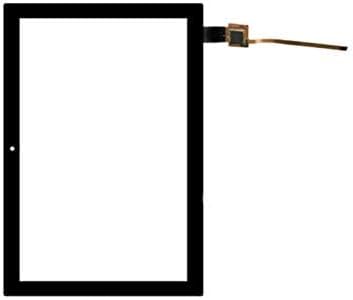
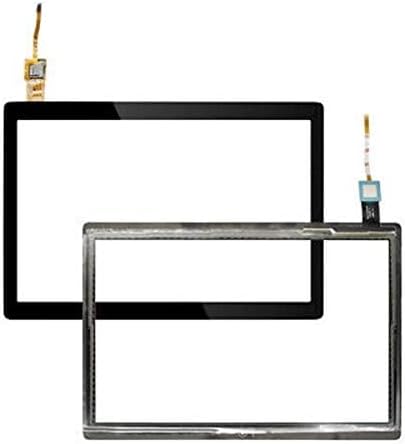
Touch Glass Digitizer Screen Glass for Lenovo Tab M10 TB-X505 X505F X505L 10.1" (Black)
86% of respondents would recommend this to a friend
Item #:
24803125
SLE 551
Price Details
Excluding Shipping & Custom charges ( Shipping and custom charges will be calculated on checkout )
*All items will import from US
In stock
 Imported from USA store
QTY:
Only 5 items left in stock.
Order now and get it around Monday, September 28
Secured transaction
Ubuy works hard to protect your security and privacy. Our advanced payment security system ensures confidentiality by encrypting your information during transmission using AES (Advanced Encryption Standards) and SSL (Secure Socket Layer) protocols. Your payment details are 100% secure as we do not share your payment details with third party sellers.
Our Top Logistics Partners


100% brand new and high quality

Fast
Shipping

Free
Return*

Secure Packaging

100% Original Products

PCI DSS Compliance

ISO 27001 Certified



Note: Step Down Voltage Transformer required for using electronics products of US store (110-120). Recommended power converters Buy Now.


What Stands Out
Precision Touch Response
Designed specifically for Lenovo Tab M10, this digitizer ensures accurate touch response, allowing users to navigate seamlessly without lag or interruptions, enhancing overall user experience.
High Durability
Crafted from premium materials, the glass offers exceptional durability and resistance to scratches, ensuring a long-lasting product that withstands everyday demands and maintains clarity.
Easy Installation
The digitizer comes with a user-friendly design that facilitates simple installation, empowering users to replace the screen without professional help, thus saving time and service costs.
Product Details
| Compatible Devices | Lenovo Tab M10 |
| Form Factor | Cover |
| Compatible Device Size Maximum | 10.1 inches |
| Additional Features | Anti-Slip |
| Compatible Phone Models | Lenovo Tab M10 |
| Water Resistance Level | Not Water Resistant |
| Color | Black |
| Pattern | Solid |
| Theme | Glass |
| Item Weight | 0.22 kg |
| Brand | Mustpoint |
| UPC | 745860066727 |
| Age Range Description | Adult |
| Manufacturer | Mustpoint |
| Enclosure Material | Glass |
| Material | Glass |
Who Should Buy?

-
Tablet Users
Ideal for Lenovo Tab M10 users needing a replacement screen after accidental damage or normal wear and tear.
-
DIY Repair Enthusiasts
Great for individuals who enjoy repairing their own devices and want to save on repair costs.
-
Budget-Conscious Consumers
A cost-effective solution for those looking to maintain their tablet without purchasing a new device.

-
Casual Users
Not suitable for users with minimal tablet usage, as investing in repairs may not be justified.
Product Description
Have any Query? Chat with us
Customer Questions & Answers
-
Question:
What models are compatible with the Touch Glass Digitizer Screen for Lenovo Tab M10?
Answer: The Touch Glass Digitizer Screen is compatible specifically with Lenovo Tab M10 models TB-X505, X505F, and X505L. Each model has unique specifications and dimensions, so ensuring compatibility is crucial to a successful installation. This means that if you own any of these models, you can confidently purchase this digitizer screen, knowing it will fit perfectly. Always double-check your tablet's model number before making a purchase to avoid any issues. -
Question:
How can I replace the digitizer screen on my Lenovo Tab M10?
Answer: To replace the digitizer screen, begin by turning off your device and removing the back cover, if applicable. Carefully detach the old digitizer from the tablet, ensuring no damage to internal components. Then, align the new digitizer screen with the connectors, press firmly, and restore the back cover. Utilizing proper tools like a heat gun and suction cup can facilitate the process. This task is ideal for those comfortable with DIY repairs or technical gadgets, allowing for an extended lifespan of your tablet. -
Question:
What signs indicate that I need a new digitizer screen for my Lenovo Tab M10?
Answer: You may need a new digitizer screen if you notice unresponsive touch areas, a cracked or shattered surface, or display distortions. Additionally, if the screen is presenting ghost touches or inconsistent responsiveness, that could also indicate a malfunctioning digitizer. Recognizing these signs early ensures you can address the problem promptly, restoring your tablet's functionality without prolonged inconvenience. -
Question:
Is the Touch Glass Digitizer Screen for Lenovo Tab M10 easy to install?
Answer: The installation process for the Touch Glass Digitizer Screen is moderately challenging but can be manageable for those who are familiar with electronics. While there are detailed guides available online, you may need special tools like a plastic spudger and heat gun to facilitate the process. For users without prior experience, seeking professional installation can ensure the job is done correctly, thus avoiding damage to your tablet and ensuring optimal performance. -
Question:
What tools do I need to install the digitizer screen?
Answer: To install the digitizer screen, you will typically need a heat gun or hair dryer, a plastic spudger, tweezers, and small screwdrivers. These tools assist in gently separating the screen from the device, unscrewing any connectors, and properly positioning the new screen. Having the right tools can make the process smoother and minimize the risk of damaging your tablet. Proper preparation with these tools can lead to a more efficient repair experience. -
Question:
Can I use my Lenovo Tab M10 while waiting for the new digitizer screen?
Answer: If your tablet screen is cracked or unresponsive, it may be difficult to use safely. However, if the device is still somewhat functional, you might be able to access settings or apps using an external keyboard or mouse with an OTG adapter. This can be a temporary workaround. However, for the best user experience, replacing the digitizer screen should be prioritized to avoid aggravating any existing issues. -
Question:
What materials are used in the manufacture of the Touch Glass Digitizer Screen?
Answer: The Touch Glass Digitizer Screen is typically made from high-quality tempered glass, providing durability and resistance against scratches and minor impacts. The glass is designed to ensure smooth touch responsiveness while maintaining clarity for display visuals. This combination of materials not only extends the life of the screen but also keeps your tablet looking sleek and functional, mimicking the original screen's performance. -
Question:
Are there any specific precautions I should take when handling the digitizer screen?
Answer: Yes, it's essential to handle the digitizer screen with care to avoid damage. Always work in a clean, dry area to prevent dust or debris from entering your device. Use anti-static gloves or tools when handling the digitizer to avoid accidental static shock, which can damage the screen's sensitive components. Taking these precautions ensures the longevity and functionality of your new screen upon installation. -
Question:
What is the difference between a digitizer and an LCD screen?
Answer: The digitizer is the top layer of a touchscreen device that detects touch inputs, while the LCD (Liquid Crystal Display) is the layer behind it that produces images. Essentially, the digitizer translates your touch into commands for the LCD to display. If you're experiencing issues related to touch responsiveness, it’s likely a problem with the digitizer. Understanding these differences can help you diagnose issues more accurately and decide on needed repairs. -
Question:
Where can I buy the Touch Glass Digitizer Screen for Lenovo Tab M10 in Sierra Leone?
Answer: You can purchase the Touch Glass Digitizer Screen for Lenovo Tab M10 directly from Ubuy in Sierra Leone. Ubuy specializes in providing a wide range of electronic parts and accessories, making it a reliable source for your replacement needs. They offer a seamless shopping experience with a variety of products to choose from, ensuring you find exactly what you need for your device.
Mustpoint Screens Editorial Review
Touch Glass Digitizer Screen Glass for Lenovo Tab M10 TB-X505 X505F X505L 10.1" (Black) is designed for optimal compatibility with Lenovo Tab M10 devices, ensuring a seamless fit and functionality. Customers have reported that it fits perfectly when installed correctly, providing an easy installation experience thanks to its anti-slip design. However, some users faced compatibility issues with specific models and expressed concerns about the product's performance after installation. It’s advisable to ensure the correct model before purchasing, as one review indicated challenges with the digitizer not functioning properly. Despite some setbacks, many users have found success in replacing their screens easily after considering installation requirements.
Customer Reviews & Ratings
31 customers ratings
-
5 Star
59%
-
4 Star
15%
-
3 Star
9%
-
2 Star
0%
-
1 Star
17%
Review this product
Share your thoughts with other customers
Pros
- Perfect fit for Lenovo Tab M10
- Easy installation process
- Anti-slip feature enhances usability
- Designed specifically for 10.1-inch devices
- Durable glass material used
Platform Trust & Buyer Confidence

JK
Jasmin
Verified buyer
“Great products and very good service: very easy and very fast international delivery.”
9 September 2026 · via Trustpilot
AG
Anke
Verified buyer
“Wonderful online shopping experience, smooth transaction from the start. Payment method works conveniently and delivery is unexpectedly fast and reliable. You go the extra mile for service. What makes this even more amazing, you deliver to Namibia. I will remain a happy Ubuy customer and will increase my purchases for sure! Thank you!”
10 September 2026 · via Trustpilot
H
Hazel
Verified buyer
“Very easy to find the products what you need, and so fast delivery, that’s why I highly recommended to others costumers to used ubuy.”
10 September 2026 · via Trustpilot
O
Opaleye
Verified buyer
“I received exactly what I ordered I was skeptical about your site because that was my first time to order. But the order came timely and neatly packaged. I was not disappointed. Thank you.”
11 September 2026 · via Trustpilot
AC
Adele
Verified buyer
“Easy to find and order what you want on the website. Delivery is quick to the UK”
8 September 2026 · via Trustpilot
Secure Checkout
Global Delivery
Easy Returns
Genuine Products
Product Price History
Important information
- Limitations : For products shipped internationally, please note that any manufacturer warranty may not be valid; manufacturer service options may not be available; product manuals, instructions, and safety warnings may not be in destination country languages; the products (and accompanying materials) may not be designed in accordance with destination country standards, specifications, and labeling requirements; and the products may not conform to destination country voltage and other electrical standards (requiring use of an adapter or converter if appropriate). The recipient is responsible for assuring that the product can be lawfully imported to the destination country. When ordering from Ubuy or its affiliates, the recipient is the importer of record and must comply with all laws and regulations of the destination country.
- Not all the products listed on Ubuy are for sale, as Ubuy is a global search engine. Products are subject to export/trade regulations.
SLE 551
Order now and get it around Monday, September 28
This item is not restrict in my country.(Please click on above link if this item is not restrict in your country, So our team will review and allow.)
QTY:
Only 5 items left in stock.
Secured transaction
PCI DSS compliant and ISO 27001:2022 certified, with encrypted payments and full buyer protection on every order.
Our Top Logistics Partners
Fastest cross-border delivery
Features & Benefits
- Touch Glass Digitizer Screen Glass for Lenovo Tab M10 TB-X505 X505F X505L 10.1
- Each item has been checked and in good condition before shipping
- Professional installation is highly recommended
- Excellent after-sell service
Ubuy Assurance
Experience worry-free shopping with 100% original products, PCI DSS-compliant payment security, ISO 27001-certified data protection, the fastest cross-border delivery, free returns *, and secure packaging on every order.